Roblox Viruses / Backdoors
Home / General Support / Roblox Viruses / Backdoors** NOTE: This is not finished **
This is more of a blog post than a support article but anyway. It's also not going to be very long or super detailed because the average person here can't read a block of text for more than 5 seconds.
So,
1. What are Roblox viruses / backdoors?
Basically, they're just scripts that insert some assets/code that notify the owners of the virus that a game has it so they can do stuff. The scripts are most often inserted using fake plugins (I'll go into them later). Less often they're just in free models.
2. Detecting virus scripts
2.1. Free models
When inserting free models, Roblox will give you a warning if the model contains scripts. If you get the warning, look through the scripts to make sure they're not viruses (explained in section 3). You should not trust any scripts in free models

You can use the search field in the Explorer window to find all scripts by searching for is:LuaSourceContainer. This also includes ModuleScripts, if you want only normal scripts, then you can just search for is:Script which is a lot easier to remember.
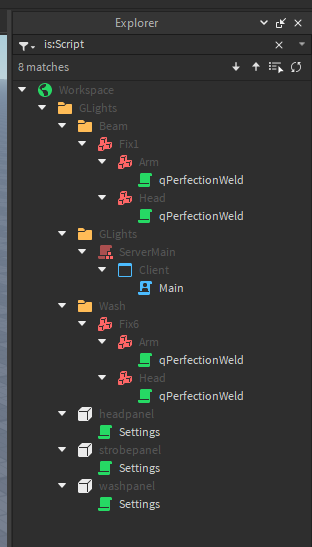
2.2. Fake plugins
Whenever a plugin tries to insert or modify a script for the first time, Roblox will give you a warning. A part counter plugin doesn't need to insert scripts, a building plugin doesn't need to insert scripts. Don't trust plugins. Also remember that plugins are still just models, you can freely look around their source code to make sure they're not sus (section 3).
Another thing to note is that there's a lot of fake plugins, aka plugins that are copies of real ones but also contain malicious code. Check the maker of the plugin before installing it. Also don't just look at the name and decide that they're trusted, groups can upload plugins as well and often people will make groups with names of popular Roblox developers to try and confuse people
Right now, go into Studio, click on the Plugins tab and select Manage Plugins. Go through each enabled one and check if:
- It has script injection permissions (and disable them if you know the plugin doesn't need them). You can see if it has injection permissions by looking at this text:
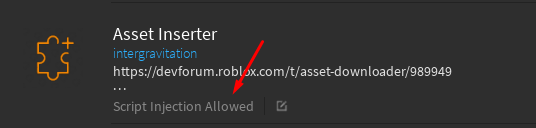
- If the owner is trusted. Open the plugin in a browser, check the creator, check the ratings, etc. If you have Better Roblox (I think?) installed, then you can also quickly peek at the source code of the plugin
2.3. Verified developers
This might not be very important, but still cool to know.
Roblox separates "verified" developers from "unverified" ones. By default, you can only see assets from "verified" developers. Note that verification might not mean much, Roblox seems to be changing their requirements for that quite often, but to be "verified", a developer needs to have either a phone number added to their account or be ID verified. One of those is obviously easier to fake than the other
2.4. "Trusted" models
Once again, an important thing to remember is that if you have an infected plugin then even trusted models can contain viruses because you indirectly inserted them into it. Even if you just insert GLights or some paid product, make sure to look through its scripts before sending your prop to make sure that it doesn't have viruses.
2.5. Anti virus plugins
There are quite a few of those on the marketplace. They basically work by checking some of the stuff detailed below and warning you about it automatically. Most of them seem to not be getting regular updates anymore though. I personally don't use one, but maybe you might want to look into it. Just make sure the antivirus plugin is not a virus...
3. Looking through possible virus scripts
So you have some sus looking scripts (or just scripts in general) and you don't know how to see if they're viruses or not. Here are a few tips:
3.1. Debounce, empty name, etc.
If a script is named something like Debounce or has an empty name, it is most probably a virus. There are obviously legitimate scripts that could be named Debounce, but more often than not it IS a virus. Here are some virus examples:
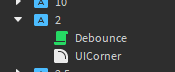
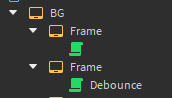
3.2. "This script is used by Roblox to keep your game exploiter free"
This is the part where we actually start analysing the code of the scripts.
First let's talk about the big text above. Roblox does NOT need to insert scripts in Studio to have code running. The entire topbar / pause menu / player list and even player characters are scripts inserted by Roblox when the game starts. Scripts that say they're made by Roblox are just lying and are most likely viruses. This is a virus:

3.3. Small horizontal scroll bars
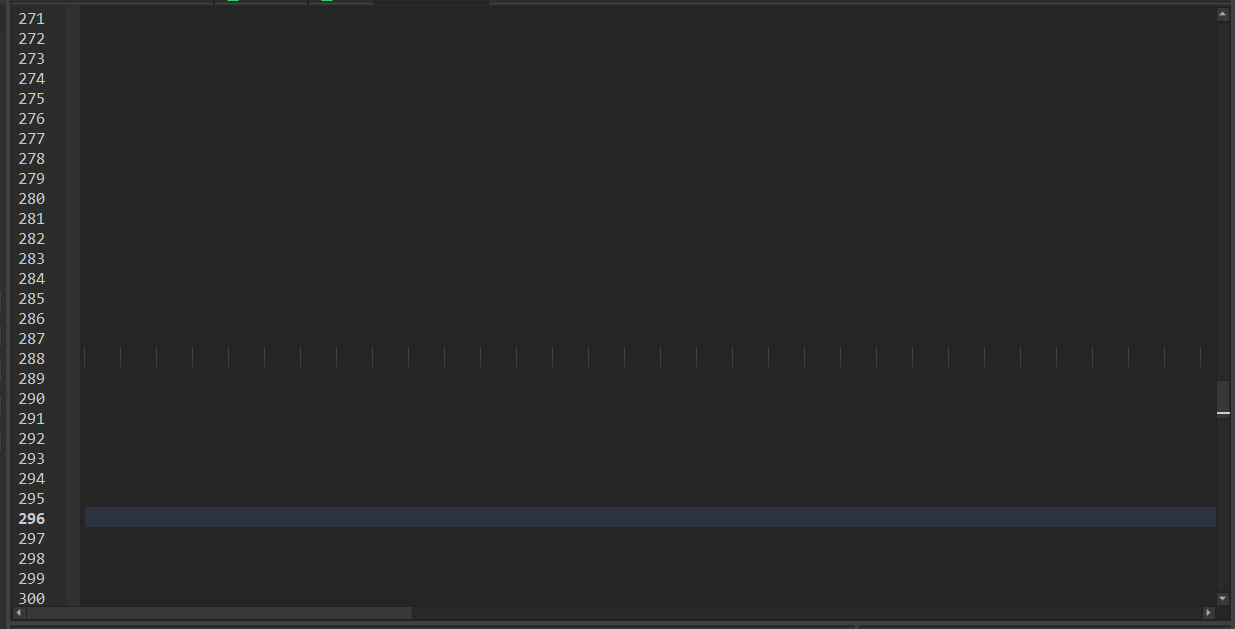
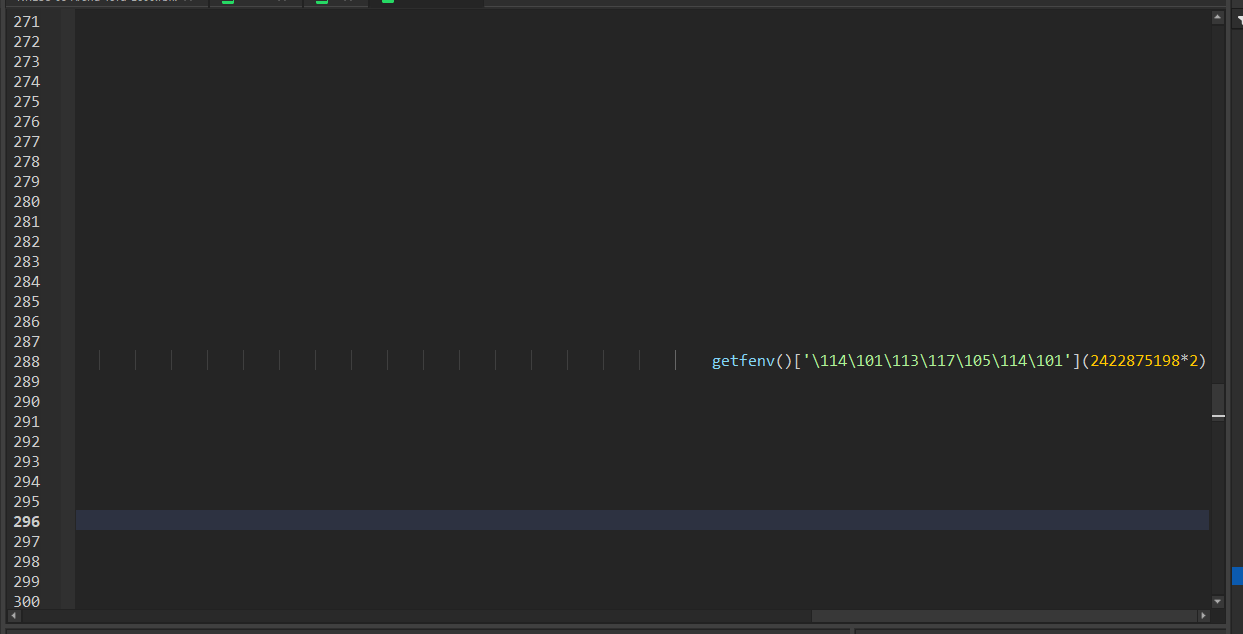
If you see that the scroll bar at the bottom of the script editor is quite small, it most likely means that someone tried hiding some code in there. Usually you can find the line where the code is by enabling a setting in Studio that shows spaces and tabs and then going to that line and scrolling through it. Scripts that try to hide code are most likely viruses. This script is trying to hide something from you by having it out of view, as shown by this scroll bar size:

You can see that there's some code here, thanks to roblox showing tabs:
And here is the virus code, visible when you scroll to the right:
3.4. RoSync or whatever
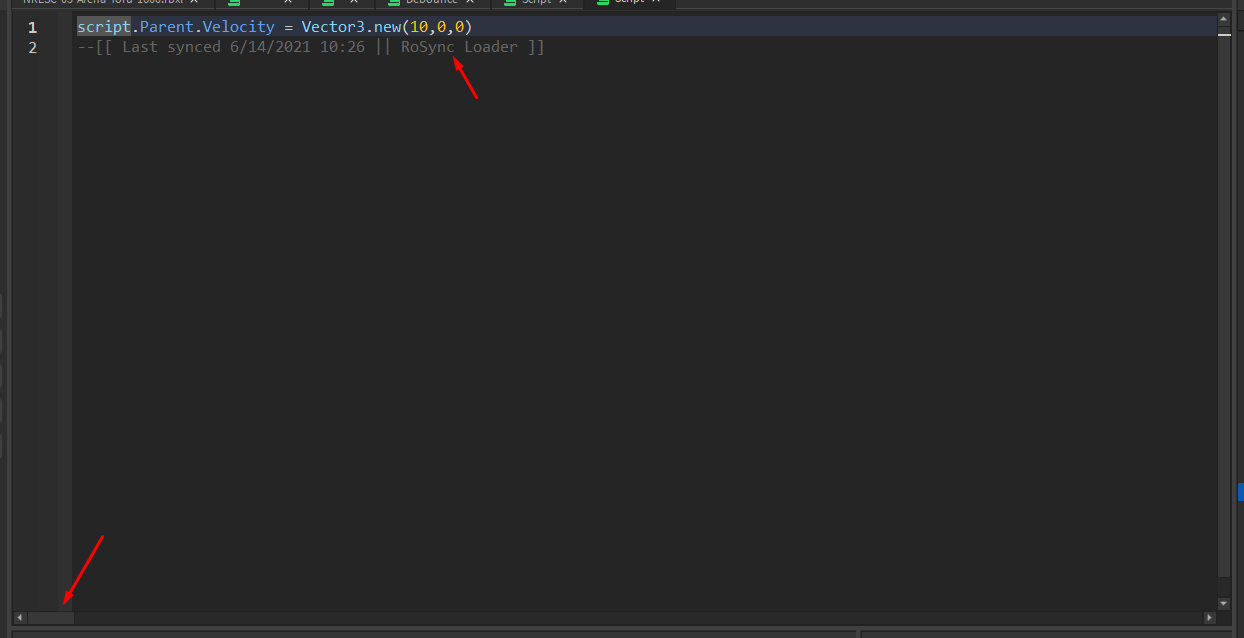
This is also a virus, although this one seems to be a bit smarter because the plugins that are infected with it are appending code into existing scripts instead of just creating new ones. Remove anything below the RoSync message, including the message itself.
In this script, the first line is legit, but the second one is hiding virus code. You can also see that by the scroll bar size
3.5. Weird code in general (obfuscated code)
This is gonna be hard to explain, but if you see a TON of code on one line, or code that has stuff like IlIlIlIlIlIl then it is trying to hide something from you. Now, obfuscation is often used by paid products to make it harder to gain access to them without paying, but if you just inserted a free model and it has code like this, it is most likely a virus.
This is a virus:

3.6. Other suspicious code bits
getfenv is practically never used non maliciously. If you press ctrl + shift + f, you can pop up a global search menu, if you find any scripts using getfenv, they're most likely viruses. ⚠️ Just like with the obfuscation bit above, some paid products DO use getfenv as part of the obfuscation even when they're legit.
require(NUMBERS) is an interesting case. This code is used to insert the asset with an id of NUMBERS into the game. It IS used legitimately by some models (admin modules, my camera system, etc.) but in general it's very often used by viruses. For example, my camera system (v5) runs this code: require(8560288484) to automatically update. If you go to https://roblox.com/library/8560288484, you can see that the asset it downloads IS owned by me (or by the Gybasoft group in the case of the Nightly version, which is owned by me). This is another case where you need to use common sense, a face giver doesn't need to get more code from the internet for example.
HttpService, this is a very very rare case, but some viruses might try using http service directly in your game. Not gonna go into much detail about this because I've never seen that myself
3.7. Check the output
The output is used by scripts to show you stuff, or warn you about stuff, or to show errors. Roblox also uses it for some security measures. To open the output, go to the View section in Studio and press Output.

Here are some things to look our for:
3.7.1. requires
Whenever a script runs require(NUMBERS), Roblox logs it in the output. If you notice it and you don't recognise the script that ran it, start looking for it. Just to remind you, there are valid cases where a script runs require for good reasons. Admin modules do that, my cameras do that, almost all paid products do that. But if you see a script you don't recognise in there, it might be a virus
3.7.2. "Http is not enabled"
Roblox will give this message the first time a model tries to use HttpService, aka when a model tries to communicate with some other website. Roblox doesn't provide details as to which script tried doing that, but it's a sign that something's not right in your game. Note that:
- Some stuff (paid products, my online voting board) DO need to use HttpService to actually do legit stuff
- Roblox only shows this message if http requests are not enabled already
3.8. RunContext.
TECHNICALLY viruses can hide themselves in places where you can't normally even see, but I've never seen that so I'm not gonna really comment on that much. Just know that this is a possibility.
4. Paid products
The funny thing about paid products is that they usually share quite a few things with viruses. They often use obfuscation, getfenv and requires to make it harder to crack them. Most paid products usually have 1 or 2 scripts very close to the "surface" in the explorer to make it cheaper and stuff. So if you own follow spotlights from Insertia, you will find 4 scripts in the scripts folder. If you see another script inserted into some random GUI button then it is most likely a virus trying to hide itself.
Summary
- Check your plugins, they're the most common cause of viruses in games
- Check all scripts of free models you insert
- Scripts named
Debounce,Fixand - If you open a script and see a horizontal scroll bar that's 3 miles long, it's very sus
If you need don't know if something is a virus or if you just want me to look through a model, you can always send the script or prop to me on Discord .gabys